
Broomie
Honest phone cleaner
Free up space you can actually see
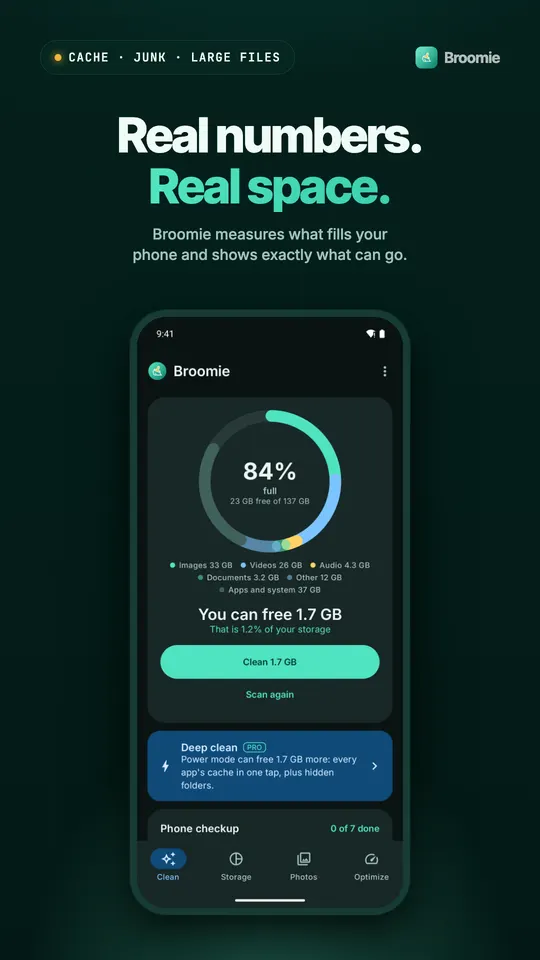
Broomie is a cache and junk cleaner with a storage analyzer built in. It shows real numbers, says why each item is listed, and deletes nothing until you confirm.
- No ads, ever
- Nothing leaves your phone
- Undo for your own files
- Android TV · Google TV
Screens
On your TV
A storage cleaner made for Android TV
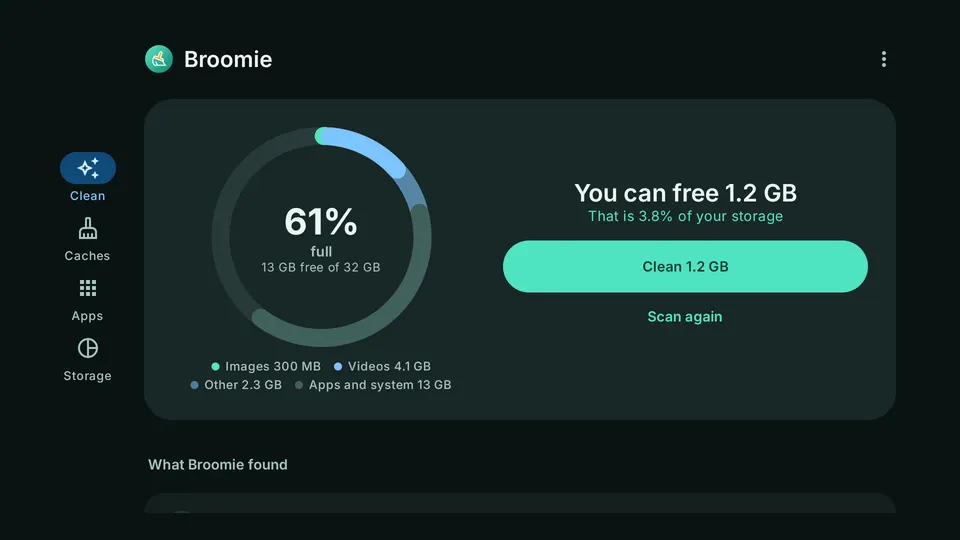
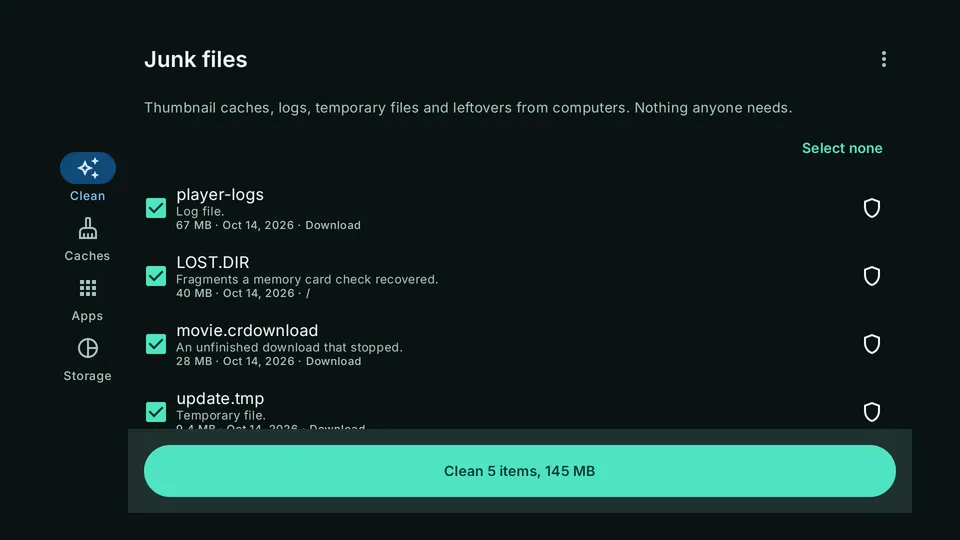
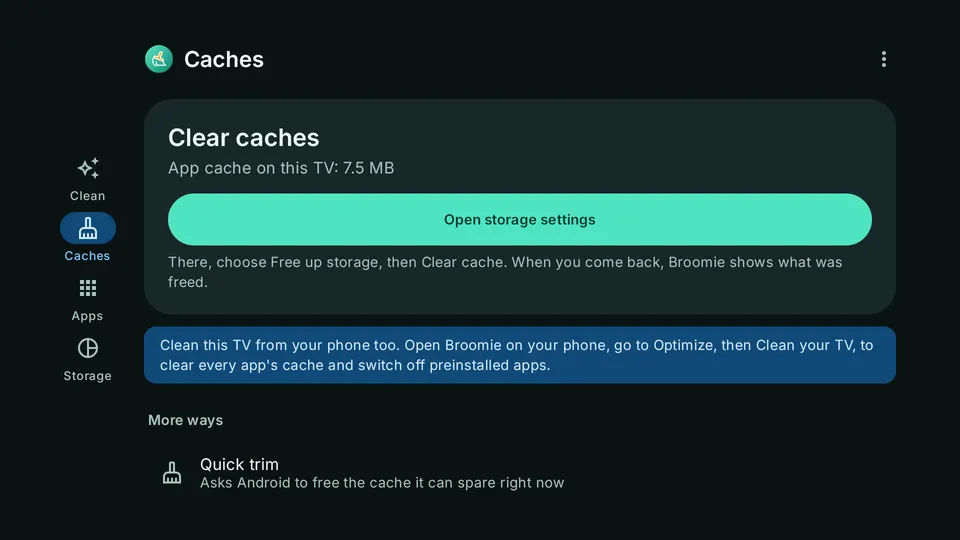
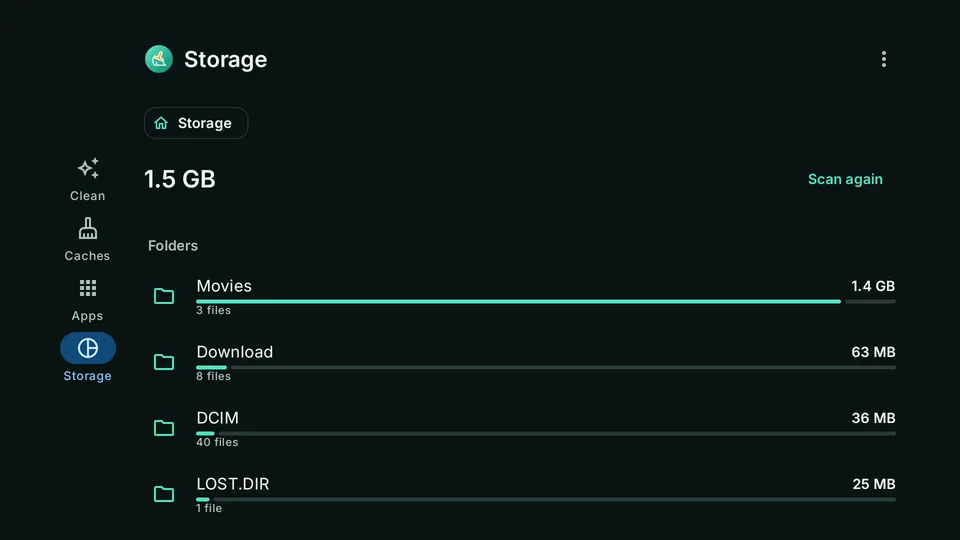
Streaming boxes fill up with installers, logs and app caches. Broomie has its own TV layout, made for the remote, that shows what fills the TV and clears it.
- Works on Android TV and Google TV, Android 11 or newer
- Scan, clean junk and old installers, and browse storage with the remote
- The Caches tab reports what each clear actually freed
- Unlock Pro on the TV, or restore what you bought on your phone
There is no Power mode on a TV. To clear every app's cache in one step or switch off preinstalled apps, use Clean your TV from your phone.

Features
Everything it finds, it explains
Junk cleaner
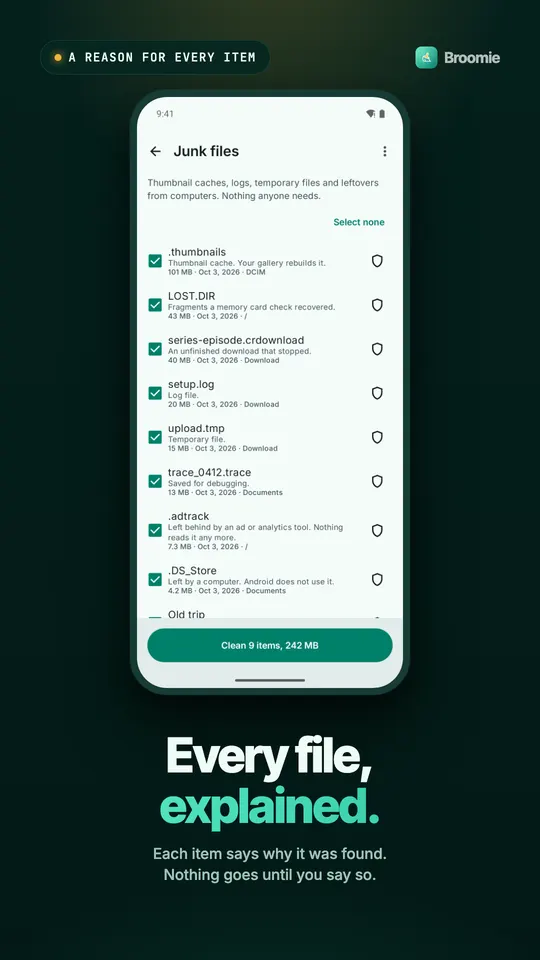
Thumbnail caches, logs, temp files, LOST.DIR, empty folders, old installer files and bug reports. Each item says why it is there.
Duplicate and similar photos
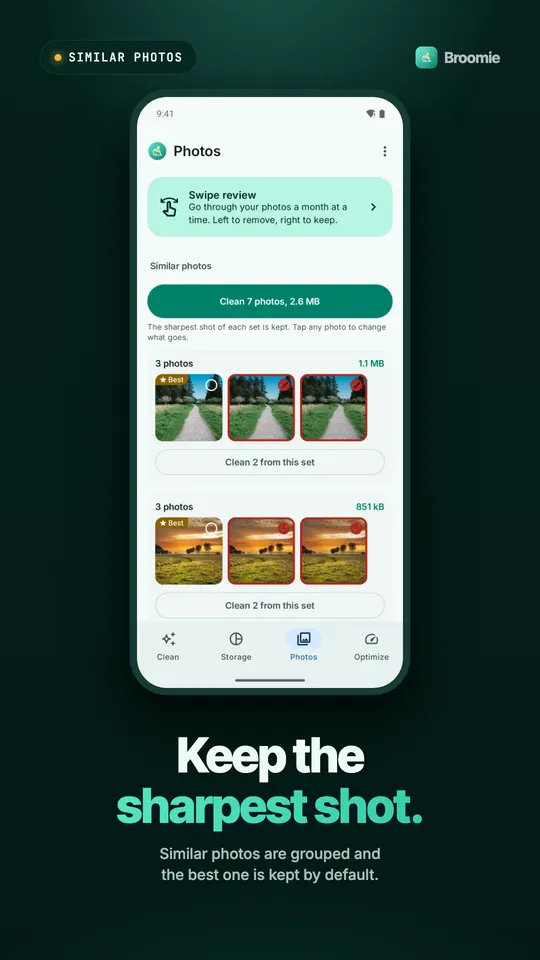
Exact duplicates and similar shots are grouped, with the sharpest one kept by default. One copy is always kept. Removing them is part of Pro.
Swipe photo review
Go through your photos month by month. Left to remove, right to keep, with undo. 50 photos a day, unlimited with Pro.
Storage analyzer
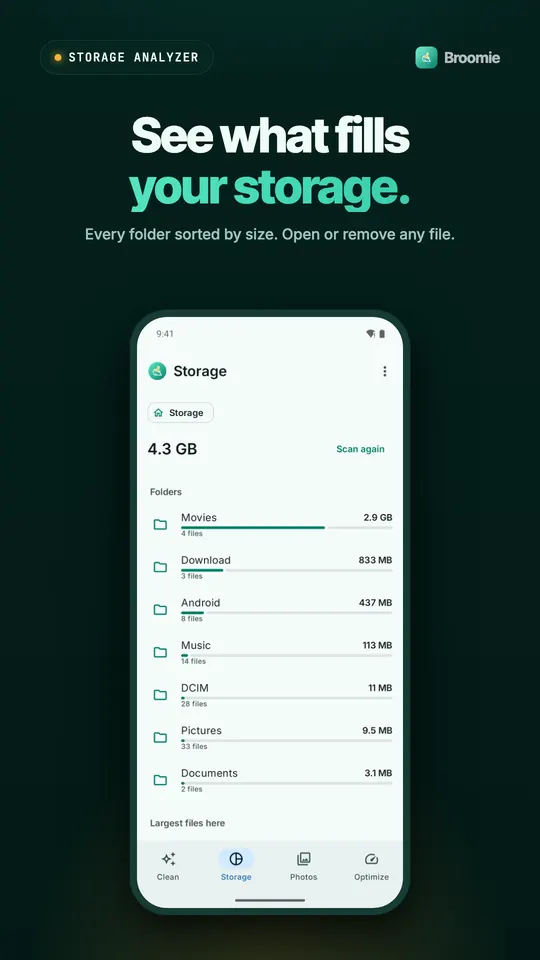
Every folder sorted by size, as deep as you want to go, plus your largest files in one list. Open or remove any file from there.
Chat media and big files
WhatsApp and Telegram media, including statuses you already viewed, large videos, screenshots and screen recordings.
Phone checkup
A short guided checkup walks you through junk, big files, photos and apps you never open. A low space warning tells you before updates run out of room.
Power mode, no root needed
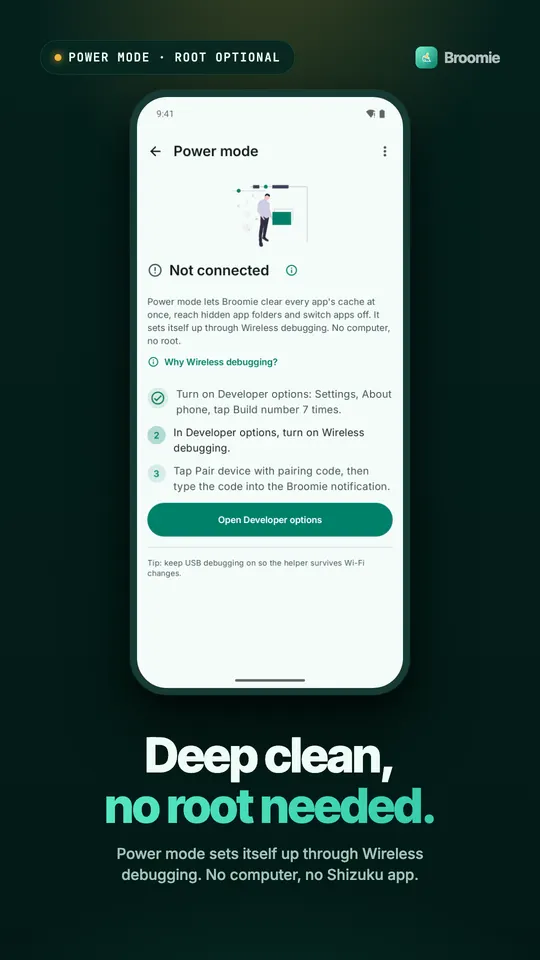
Clear every app's cache in one tap, reach hidden caches in Android/data and remove leftovers of uninstalled apps. It sets itself up through Wireless debugging, or uses root.
Optimizer
Compile apps after a system update, clean up old compiled code, restrict background activity, freeze apps you rarely use and set animation speed. Undo all puts every change back.
Scheduled cleaning
A weekly clean for junk, empty folders and caches only. Your own files are never part of it.
Clean your TV
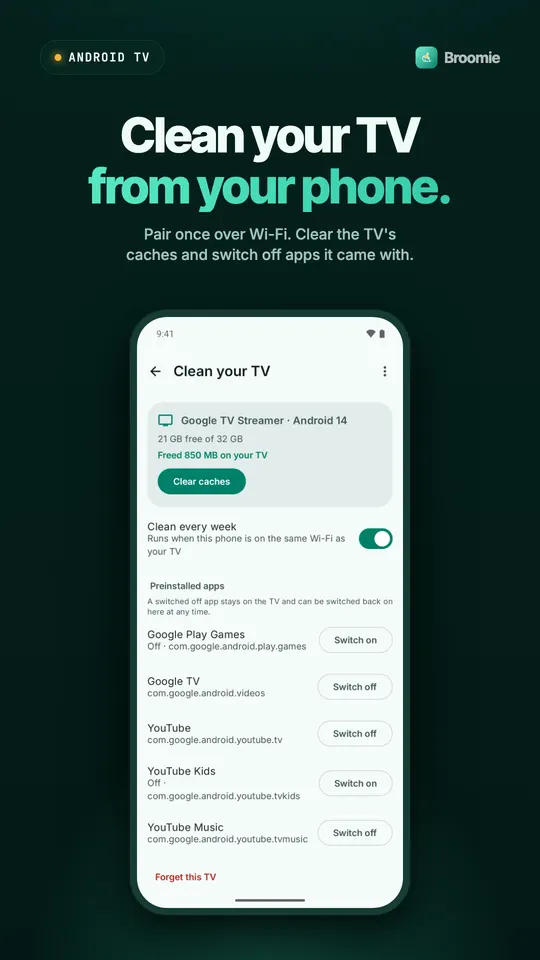
Pair this phone with an Android TV over Wi-Fi, then clear the TV's caches and switch off apps it came with. A weekly clean can run when both are on the same Wi-Fi.
How it works
- 1
Grant All files access and let Broomie scan the phone.
- 2
Read why each item is listed and untick anything you want to keep.
- 3
Clean, then check your history to see what went and how much.
Pro is a monthly or yearly subscription with a 3-day free trial, or a one-time lifetime purchase. Broomie reminds you before the trial ends, and you can cancel anytime in Google Play.Free and Pro
Pro is a monthly or yearly subscription with a 3-day free trial, or a one-time lifetime purchase. Broomie reminds you before the trial ends, and you can cancel anytime in Google Play.
Free
- Junk, installer and bug report cleaning
- Large files, screenshots and chat media
- Find duplicate and similar photos
- Swipe photo review, 50 photos a day
- Storage analyzer
- Phone checkup and low space warning
- Protect any file, folder or app
- Clean history
- Recently deleted for 3 days
Pro
- Power mode
- The optimizer
- Duplicate removal
- Unlimited swipe review
- Scheduled cleaning
- 30 days of Recently deleted
- Home screen widget
- Quick Settings tile
- Clean your TV
What you need
- Android 11 or newer
- All files access to find and remove files
- Usage access to measure app caches and find unused apps
- Power mode uses Wireless debugging or root
Version 1.2.2 · Nov 2, 2026 · What's new
Questions
Broomie: questions
Does Broomie delete my photos?
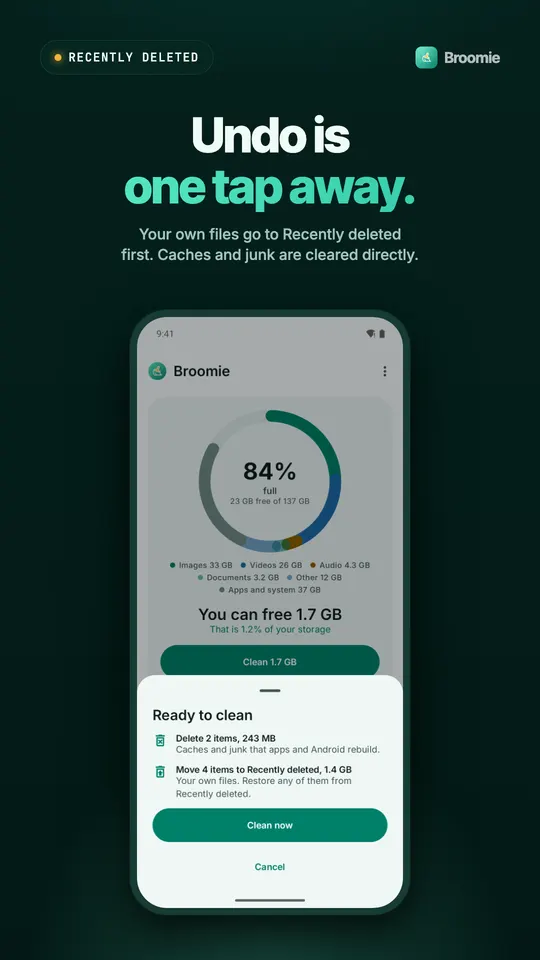
Only the ones you choose, and only after you confirm. Your own files, photos included, go to Recently deleted first, so a wrong tap takes one tap to undo. They stay there for 3 days, or up to 30 days with Pro. When you remove duplicates or similar photos, one copy is always kept, and the sharpest shot is kept by default.
How do I clear app cache on Android without root?
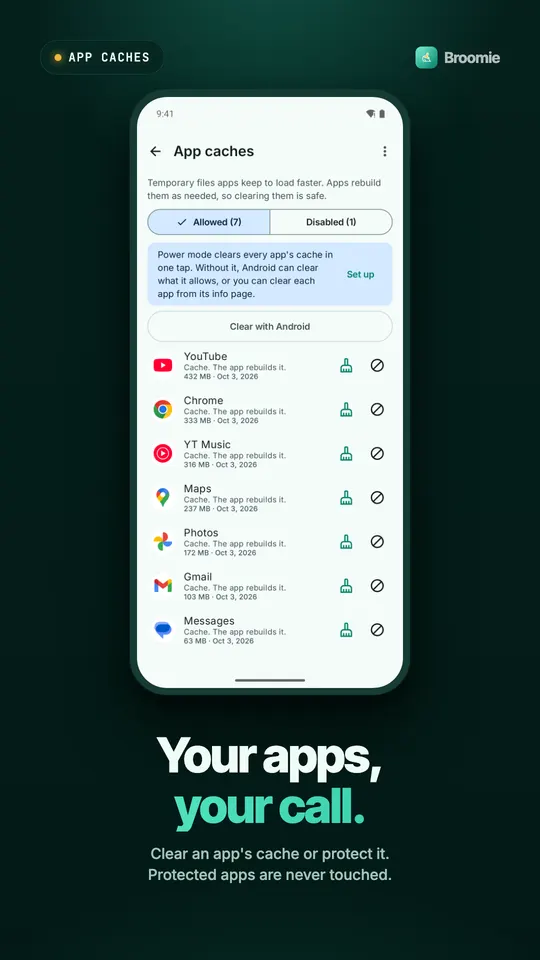
Broomie can do it two ways. Without setup, it lists each app's cache and uses Android's own clearing, or opens the app's info page. Power mode, part of Pro, clears every app's cache in one tap and reaches hidden caches in Android/data. It sets up a small helper through Wireless debugging, with no computer, no root and no extra app. Rooted phones can use root instead.
Is Broomie free?
Yes, with no ads. The free version cleans junk, installer files, large files and chat media, finds duplicate and similar photos, includes the storage analyzer and phone checkup, and lets you swipe through 50 photos a day. Pro is a monthly or yearly subscription with a 3-day free trial, or a one-time lifetime purchase. It adds Power mode, the optimizer, duplicate removal and scheduled cleaning.
Is it safe to use a phone cleaner app on Android?
It is safe when you can see what it deletes. Broomie explains why every item is listed, deletes nothing until you confirm, and sends your own files to Recently deleted instead of erasing them. Only caches and junk, which apps and Android rebuild, are deleted directly. You can protect any file, folder or app, and every clean is recorded in your history.
Does Broomie upload my files?
No. Every scan and every clean runs on your phone, and nothing leaves it. Broomie asks for All files access only to find and remove files, and for Usage access only to measure app caches and find apps you never open. There is no account to create and there are no ads.
Will a cleaner make my phone faster?
Broomie does not promise that, because it cannot measure it. What it does is free up storage you can see, with every number measured on your phone. It never fakes memory cleaning or closes your apps behind your back. The animation speed setting makes the phone feel quicker, and Broomie says plainly that it changes how it feels, not how fast it runs.
How do I clean WhatsApp media on Android?
Run a scan and open the chat media in Broomie's results. It lists WhatsApp and Telegram media, including statuses you already viewed, with the size of each item. Untick anything you want to keep, then clean. Your own media goes to Recently deleted first, so you can restore anything you remove by mistake.
How do I find what is taking up storage on my phone?
Open Broomie's Storage tab. It sorts every folder by size, lets you drill down as deep as you want, and lists your largest files in one place. You can open or remove any file from there. The home screen also shows how full the phone is, split into images, videos, audio, documents, apps and other.
Can Broomie clean my Android TV?
Yes, from your phone, with Pro. Turn on Wireless debugging on the TV, pair it once with the six-digit code it shows, and Broomie clears the TV's caches and reports what it freed. It can also switch off preinstalled apps and switch them back on at any time. The TV needs to be on Wi-Fi. Older TVs with Network debugging work too.
Guides
Guides for Broomie
Storage
How to Clear Cache on Android (Every Phone, One App or All)
Clear cache on Android for one app or every app: exact steps for Pixel, Samsung, Xiaomi and OnePlus, Chrome's cache, and Clear cache vs Clear storage.
Read moreStorage
How to Free Up Storage on Android Without Losing Anything
Find what is filling your Android storage, use the built-in Free up space and Files by Google tools, then clear junk, duplicates and chat media safely.
Read moreCompare
How Broomie compares
Compare
Broomie vs CCleaner for Android: Which Cleaner Should You Use?
Broomie vs CCleaner for Android as of October 2026: no ads, a reason for every item, undo for your own files and no accessibility service needed.
Read moreCompare
Broomie vs Files by Google: Which Android Cleaner Do You Need?
Broomie vs Files by Google as of October 2026: what Broomie adds on top of Google's Clean tab, from similar photos and undo to every app's cache at once.
Read moreCompare
Broomie vs SD Maid SE: Which Android Cleaner Is Right for You?
Broomie vs SD Maid SE as of October 2026: one guided scan, a reason for every item, undo for your files and every cache cleared without root or a computer.
Read moreMore from llcloud
Pairs well with



Try Broomie today.
Broomie is a cache and junk cleaner with a storage analyzer built in. It shows real numbers, says why each item is listed, and deletes nothing until you confirm.