Independent Android apps
Android apps that do one thing properly.
A notification light around your camera, a firewall that leaves your VPN alone, a cleaner that explains every file. Free to try, ad-free, made by one developer.
- No ads in any app
- No accounts or sign-up
- A pay-once option on every app
- Answered by the person who built it
Most installed
AuraDisplay
Notification light for Android
See every notification without unlocking
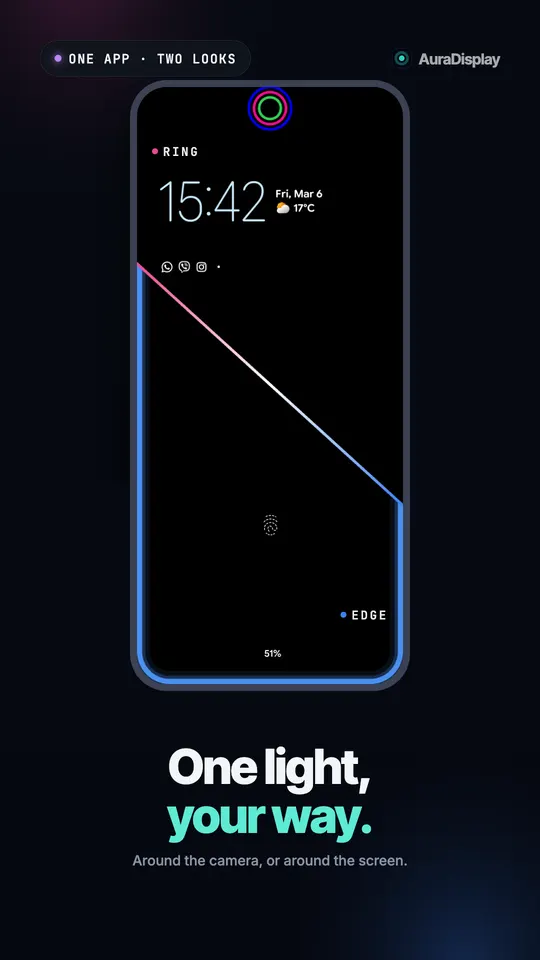
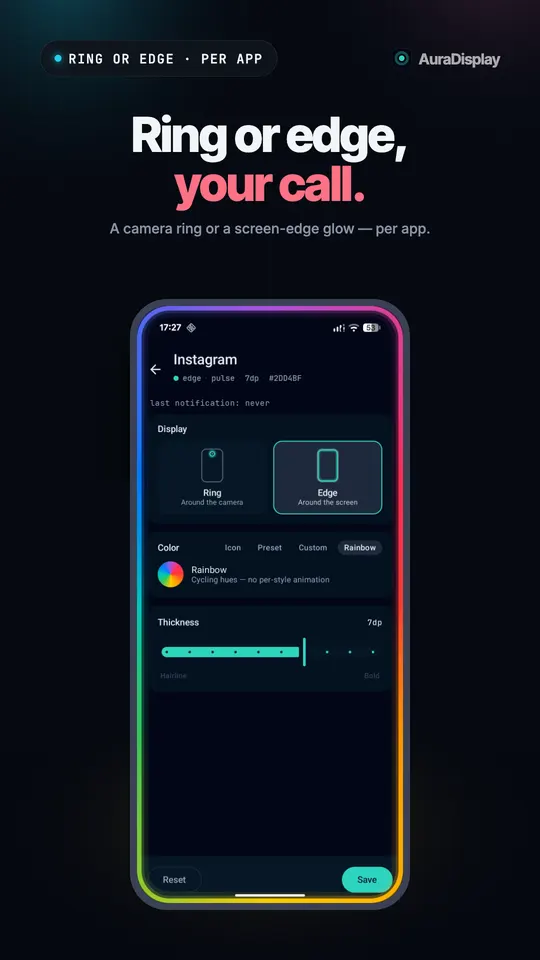
AuraDisplay is a notification light for Android. A glowing ring wraps your punch hole camera, or a soft glow runs along the screen edge, in each app's own color.

4.0 · 734 ratings · 10K+
The apps
Each one fixes a small thing Android left out. Pick the one that bugs you most.
On Google PlayNotification light
AuraDisplay
A notification light around your camera or screen edge
 On Google Play
Notification light
AuraGlow
The Pixel 11 Pro HiLight ring, for every notification
 On Google Play
Phone care
Broomie
Cache and junk cleaner that explains every item
 On Google Play
Phone care
AppVolume
Its own volume for every app on your phone
 Coming soon
Phone care
Lithie
Battery health in mAh, a charge limit and a cable test
 On Google Play
Privacy
Repel Android TV
DNS filter, tracker blocker and per-app firewall
 Coming soon
Privacy
Velum
An encrypted vault for your photos, videos and files
 On Google Play
Personal
Tessera
A museum painting as your wallpaper, every day
 On Google Play
Just for fun
SlapPhone
Slap your phone. It screams back.
How these apps are made
Honest by default
Every app says what it does and what it cannot do. No fake alerts, no scare screens, no dark patterns on the paywall.
Your phone, your data
The apps work on the phone. Nothing you clean, hide or block is uploaded, and none of them asks you to make an account.
Pay once if you like
Every app is free to try. Every Pro has a one-time option, so you can own it instead of renting it.
Guides that fix real Android problems
Step-by-step answers for the things phone makers do not explain.
Notification light
How to Get a Notification Light on Any Android Phone (2026)
Your phone has no notification LED? Use Android's free flash notifications, your phone's edge lighting, or a light around the camera cutout. Steps for each.
Read moreKeep apps running
Why Android Kills Background Apps, and How to Stop It (2026)
Why your phone closes apps in the background, why notifications, lights and filters stop, and the settings that help on Samsung, Xiaomi, OnePlus and more.
Read morePrivacy and security
How to Block Trackers on Android Without a VPN (2026)
Block tracker and malware domains on Android without a VPN using Private DNS, then cut chosen apps off the internet with a firewall that leaves your VPN free.
Read moreFree Android tools
Small, free tools for your phone that run entirely in your browser. No sign-up, no upload, nothing leaves your device.
Free photo location remover
Phones save where every photo was taken. Check any picture for GPS location and download a clean copy with all hidden metadata removed.
Open toolFree notification light preview for your phone
Open this page on your phone, pick a colour and go full screen. A ring of light appears around where your front camera sits, the way AuraDisplay draws it.
Open toolFree dead pixel and burn-in test
Fill your screen with solid colours to spot dead pixels, stuck pixels and burn-in, the faint ghost images that OLED screens can keep.
Open toolQuestions about llcloud
Are llcloud apps free?
Yes. Every llcloud app is free to download and the free version is useful on its own. Each app has an optional Pro upgrade for extra features, and every Pro can be bought once and kept for life. Two apps, Broomie and Lithie, also offer Pro by the month or year for people who prefer that.
Do llcloud apps have ads?
No. None of the apps show ads, in the free version or in Pro. They earn money only from people who choose to buy Pro, so there is no reason to fill your screen with banners or sell your attention to an ad network.
Do the apps upload my photos, files or notifications?
No. The work happens on your phone. Nothing you clean, hide, block or get notified about is uploaded. Some apps send anonymous usage counts and crash reports so bugs get fixed, and each app's privacy policy lists exactly what it sends and why.
Who makes llcloud apps?
One independent developer builds, tests and supports every app. When you email support, the person who wrote the code reads it. That is also why the apps stay small and focused: each one does one job and is kept working through Android updates.
Which phones do the apps work on?
Most llcloud apps run on any Android phone from Android 8 or Android 11 upward, from Samsung, Google Pixel, Xiaomi, OnePlus, Motorola and others. AuraGlow is the exception: it is made for the HiLight ring on the Pixel 11 Pro, Pro XL and Pro Fold. Each app page lists exactly what it needs.
How do I get help with an app?
Email support@llcloud.app, or use the help and diagnostics option inside the app, which attaches a log with no personal content. Most questions get an answer within a day or two. The guides on this site also cover the common fixes, like stopping your phone from closing apps in the background.